
DevOps_04_김재환
2023.06.19
2023.06.19
2023. 6. 19. 20:46ㆍ부트캠프/Final
1.공동작업 데이터테이블 SQL 스크립트
CREATE DATABASE RECORD;
USE RECORD;

CREATE TABLE competition (
    seq INT NOT NULL AUTO_INCREMENT PRIMARY KEY,
    title VARCHAR(50) NOT NULL,
    start_day VARCHAR(10) NOT NULL,
    recruits INT NOT NULL
);

CREATE TABLE participant (
    seq INT NOT NULL AUTO_INCREMENT PRIMARY KEY,
    competition_seq INT NOT NULL references competition(seq),
    user_id VARCHAR(20) NOT NULL,
    user_name VARCHAR(20) NOT NULL,
    reg_date DATETIME NOT NULL
);

CREATE TABLE competition_type (
    seq INT NOT NULL AUTO_INCREMENT PRIMARY KEY,
    type_name VARCHAR(20) NOT NULL
);

CREATE TABLE record (
    seq INT NOT NULL AUTO_INCREMENT PRIMARY KEY,
    competition_seq INT NOT NULL references competition(seq),
    participant_seq INT NOT NULL references participant(seq),
    complete_status bit(1) NOT NULL,
    competition_type_seq INT NOT NULL references competition_type(seq),
    reg_date DATETIME NOT NULL
);

CREATE TABLE offtherecord (
    seq INT NOT NULL AUTO_INCREMENT PRIMARY KEY,
    user_id VARCHAR(20) NOT NULL,
    title VARCHAR(50) NOT NULL,
    complete_status bit(1) NOT NULL,
    competition_type_seq INT NOT NULL references competition_type(seq),
    reg_date DATETIME NOT NULL
);

CREATE TABLE payment_point (
    seq INT NOT NULL AUTO_INCREMENT PRIMARY KEY,
    participant_seq INT NOT NULL references participant(seq),
    record_seq INT NOT NULL references record(seq),
    point INT NOT NULL,
    reg_date DATETIME NOT NULL
);
INSERT INTO competition (title, start_day, recruits) values ('1차 마라톤대회', '2023-6-27', 10);

INSERT INTO competition_type (type_name) values ('10km'), ('Half'), ('Full');
2. DB 생성
테라폼으로 진행 db.tf 생성
provider "aws" {
    region = "ap-northeast-2"
}

resource "aws_db_instance" "default" {
    allocated_storage    = 20
    storage_type         = "gp2"
    engine               = "mysql"
    engine_version       = "8.0"
    instance_class       = "db.t2.micro"
    username             = "root"
    password             = "12345678"
    parameter_group_name = "default.mysql8.0"
    skip_final_snapshot  = true
    publicly_accessible  = true
}
# 오류
aws 콘솔에서 확인 했을 때 퍼블릭 액세스 가능이 아니오로 되어있었다. 이러면 공동 작업이 안되기 때문에 생성한 db을
destroy 하고 publicly_accessible = true 코드 추가후 재 적용 시켰다.
3. 대회 정보 생성
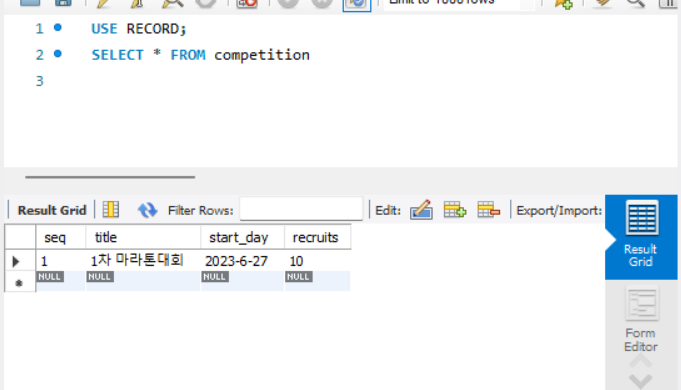
대회 정보는 직접 데이터베이스에 넣어주고 생성 확인
4. 업무 분배
offtherecord와 point부분을 맡아서 진행하기로 했다.
서버는 fastify로 사용하기로 정했다.
#오류
Error: Cannot find module 'mysql
mysql 종속성을 위해 npm install mysql 적용
5. app.js 및 route.js 생성
# app.js

"use strict";

const path = require("path");
const AutoLoad = require("@fastify/autoload");
const offtherecord = require("./routes/offtherecord/index");
const competition = require("./routes/competition/index");
const competition_type = require("./routes/competition_type/index");
const payment_point = require("./routes/payment_point/index");

// Pass --options via CLI arguments in command to enable these options.
module.exports.options = {};

module.exports = async function (fastify, opts) {
  // Place here your custom code!
  fastify.addHook("preHandler", async (request, reply) => {
    const auth = request.headers.authorization;
    // 1. cogniton 검증 로직 추가
    // 2. 유저아이디, 유저네임 할당

    if (false) {
      reply.code(401).send({ status: "Unauthorized" });
    }
  });

  fastify.register(require("@fastify/mysql"), {
    promise: true,
    connectionString:
      "mysql://username:password@hostname",
  });

  fastify.register(offtherecord);
  fastify.register(competition);
  fastify.register(competition_type);
  fastify.register(payment_point);

  fastify.register(AutoLoad, {
    dir: path.join(__dirname, "plugins"),
    options: Object.assign({}, opts),
  });

  fastify.register(AutoLoad, {
    dir: path.join(__dirname, "routes"),
    options: Object.assign({}, opts),
  });
};
# offtherecord.js
'use strict';
const mysql = require('mysql');
const connection = mysql.createConnection({
host: 'hostname',
user: 'username',
password: 'password',
database: 'dbname'
});
connection.connect((err) => {
if (err) {
console.error('Error connecting to MySQL database:', err);
process.exit(1);
}
console.log('Connected to MySQL database');
});
module.exports = async function (fastify, opts) {
fastify.get('/offtherecord', (request, reply) => {
connection.query('SELECT * FROM offtherecord', (err, results) => {
if (err) {
console.error('Error executing MySQL query:', err);
reply.status(500).send('Error executing query');
return;
}
reply.send(results);
});
});
fastify.post('/offtherecord', (request, reply) => {
const data = request.body;
const query = 'INSERT INTO offtherecord (user_id, title, complete_status, competition_type_seq, reg_date) VALUES (?, ?, ?, ?, NOW())';
const values = [data.user_id, data.title, data.complete_status, data.competition_type_seq];
connection.query(query, values, (err, results) => {
if (err) {
console.error('Error executing MySQL query:', err);
reply.status(500).send('Error executing query');
return;
}
reply.status(201).send({ message: 'Data successfully added to database' });
});
});
}
'부트캠프 > Final' 카테고리의 다른 글
| 2023.06.12(프로젝트 시작) (0) | 2023.06.27 |
|---|---|
| 2023.06.26 (0) | 2023.06.26 |
| 2023.06.22 (0) | 2023.06.23 |
| 2023.06.21 (0) | 2023.06.21 |
| 2023.06.20 (0) | 2023.06.21 |